


Download ACE Mega Codec Pack – Free, Secure & Complete Multimedia Codec Solution
Overview
ACE Mega Codec Pack is a comprehensive collection of audio and video codecs, filters, and a lightweight media player designed to handle virtually any multimedia file you throw at it. Whether you’re a casual movie‑watcher, a gamer needing flawless soundtracks, or a content creator who regularly works with obscure file formats, ACE Mega offers a “just‑play” experience that eliminates the endless search for missing codecs. The package comes with two distinct installation modes: a streamlined “Just Play” option that installs only the essential codecs for immediate playback, and a “Professional” mode that adds an extended suite of filters, audio enhancers, and the built‑in BS Player.
This dual‑approach makes the pack suitable for beginners who want a set‑and‑forget solution, as well as power users who prefer granular control over their media environment. Because the codecs are bundled in a single, digitally signed installer, users benefit from a secure, hassle‑free setup without the risk of conflicting third‑party components. In addition, the pack receives regular updates that keep it compatible with the latest container formats, HDR video streams, and high‑resolution audio codecs.
Overall, ACE Mega Codec Pack positions itself as a one‑stop shop for reliable, high‑quality media playback on Windows PCs.
Core Features & Built‑In Player
- Extensive codec library covering H.264, H.265/HEVC, VP9, AV1, AAC, FLAC, DTS, and more.
- Audio and video filters for de‑interlacing, noise reduction, and dynamic range compression.
- BS Player integration – a lightweight, customizable media player that supports subtitles, playlists, and hardware acceleration.
- Two installation modes: “Just Play” for essential codecs, “Professional” for full‑feature deployment.
- Automatic updates via secure online repository to keep codecs current.
- Compatibility with popular media containers such as MKV, MP4, AVI, MOV, and FLV.
- Support for 4K, HDR10, and Dolby Vision video playback on capable hardware.
- Low‑impact background services that do not drain system resources.
- Comprehensive documentation and community‑driven support forum.
Why the Built‑In BS Player Matters
The inclusion of BS Player adds tangible value to the ACE Mega Codec Pack. While the codecs alone enable playback in any third‑party player, BS Player offers a seamless out‑of‑the‑box experience. Its hardware‑accelerated decoding leverages GPU support on modern GPUs, reducing CPU load during 4K playback. The player also features a clean interface, customizable skins, and robust subtitle handling with automatic language detection. For users who prefer a single application to manage both codecs and playback, BS Player eliminates the need to install a separate media player, keeping the system tidy and reducing potential conflicts.
Installation, Usage & System Compatibility
Step‑by‑Step Installation Guide
- Download the latest ACE Mega Codec Pack installer from the official website.
- Run the
.exefile and accept the license agreement. - Select your preferred installation mode:
- Just Play: Installs core codecs only – ideal for users who already have a preferred media player.
- Professional: Installs the full suite of codecs, filters, and BS Player.
- Choose the destination folder (default is
C:\Program Files\ACE Mega Codec Pack). - Click Install. The installer will automatically register the codecs with Windows Media Foundation.
- When installation finishes, you can launch BS Player from the Start menu or use any other media player; the newly installed codecs will be available system‑wide.
First‑Time Usage Tips
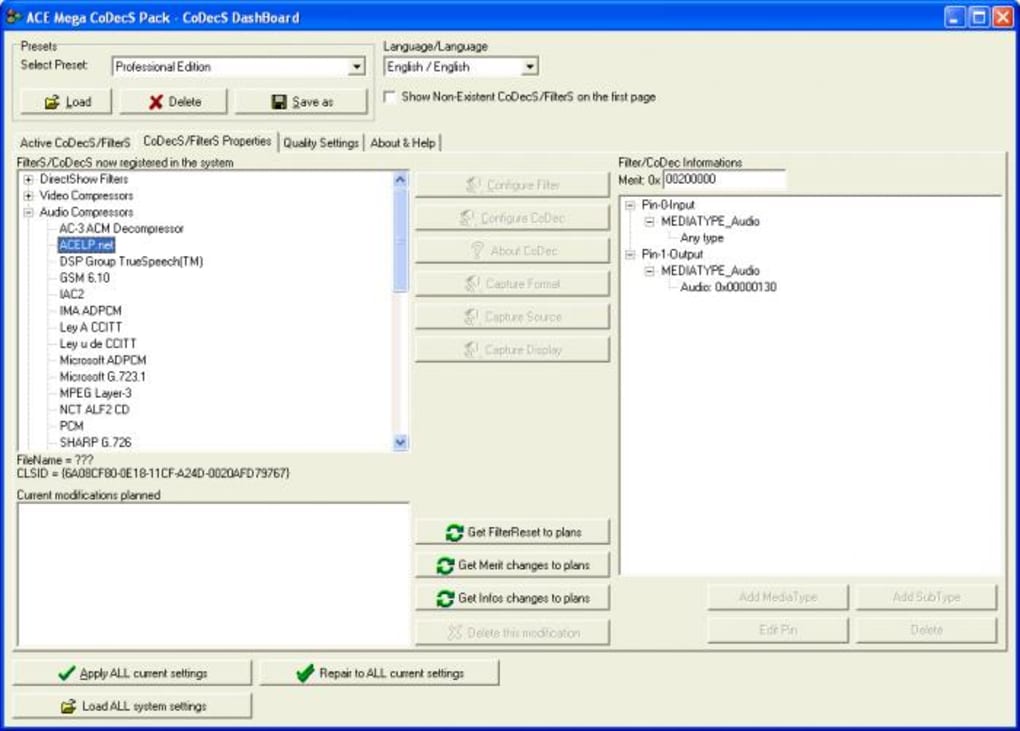
After installation, verify codec registration by opening a media file that previously displayed an error (e.g., a 4K HEVC video). If the file plays without prompts, the codecs are active. For advanced users, the Codec Configuration panel can be accessed from the BS Player settings, allowing you to enable or disable specific filters, adjust hardware acceleration preferences, and manage subtitle fonts.
System Compatibility
ACE Mega Codec Pack is designed for modern Windows environments. The official supported operating systems include:
- Windows 10 (64‑bit) – fully supported with all features.
- Windows 11 (64‑bit) – optimized for the latest multimedia APIs.
- Windows 8.1 (64‑bit) – core codec functionality works; some advanced filters may be limited.
- Windows 7 SP1 (64‑bit) – basic playback is reliable; newer codecs like AV1 require Windows 10 or later.
While the pack is Windows‑centric, the codecs themselves can be used by third‑party players on macOS or Linux via compatibility layers (e.g., Wine). However, official support and updates are only provided for Windows platforms.
Pros & Cons
Pros
- Extensive codec coverage eliminates “missing codec” errors.
- Two installation modes cater to both beginners and power users.
- Integrated BS Player offers a ready‑to‑use playback solution.
- Regular, secure updates keep the pack current with emerging formats.
- Low system overhead – codecs run in the background without noticeable performance loss.
- Free to download and use for personal purposes.
Cons
- Official support limited to Windows; macOS and Linux users must rely on work‑arounds.
- Professional mode installs a large number of components, which may be unnecessary for casual users.
- Occasional false‑positive detections by some antivirus programs due to codec registration.
- Advanced filter settings can be intimidating for non‑technical users.
Frequently Asked Questions
Is ACE Mega Codec Pack completely free?
Yes, the pack is free for personal use. There is no hidden cost or subscription required.
Will installing ACE Mega Codec Pack affect my existing media players?
The codecs are registered system‑wide, so any media player that relies on Windows Media Foundation will automatically benefit. Existing players will not be removed or overwritten.
Can I uninstall the codec pack without affecting my video files?
Yes. Uninstalling the pack removes only the codec files and registry entries. Your video and audio files remain untouched.
Does ACE Mega support the newest AV1 codec?
AV1 support is included in the Professional mode and receives updates as the codec matures. Users on Windows 10/11 benefit from hardware‑accelerated AV1 decoding where supported.
How often are updates released?
The development team publishes updates roughly every 4‑6 weeks, with occasional emergency patches for critical security or compatibility issues.
Conclusion & Call to Action
ACE Mega Codec Pack delivers on its promise of a “play anything” experience without demanding a steep learning curve. By bundling an expansive codec library, a capable media player, and a clear installation path, it stands out among the crowded codec‑pack market. Whether you’re a student watching lecture videos, a gamer seeking lossless audio, or a content creator needing reliable playback, ACE Mega provides a secure, free, and regularly updated solution. Ready to eliminate those frustrating “codec missing” errors? Download ACE Mega Codec Pack now and enjoy seamless multimedia playback today.
After testing ACE Mega Codec Pack on multiple Windows systems, I can confidently say it lives up to its “play any file” tagline. The dual‑mode installer gives me the flexibility to keep my system lean or go fully featured, and the integrated BS Player works flawlessly with 4K HDR content. The only drawback is the occasional false positive from antivirus software, but this is a small price to pay for such comprehensive codec support.







